অতি চমু প্ৰশ্ন-উত্তৰ (১৫ টা) — ১ নম্বৰীয়া
১. প্ৰশ্ন: সংৰক্ষণ ক্ৰম (Storage Hierarchy) বুলিলে কি বুজা যায়?
উত্তৰ: কম্পিউটাৰ ব্যৱস্থাত গতি, ক্ষমতা আৰু খৰচৰ আধাৰত সংৰক্ষণ সঁজুলিসমূহক যি স্তৰভিত্তিক ক্ৰমত সজোৱা হয়, তাকে সংৰক্ষণ ক্ৰম বোলে।
২. প্ৰশ্ন: প্ৰাথমিক সংৰক্ষণৰ (Primary Storage) এটি মূল বৈশিষ্ট্য লিখা।
উত্তৰ: প্ৰাথমিক সংৰক্ষণ হৈছে অতি দ্ৰুতবেগী আৰু ইয়াক চি.পি.ইউ. (CPU)-এ পোনপটীয়াভাৱে ব্যৱহাৰ কৰিব পাৰে (যেনে- RAM)।
৩. প্ৰশ্ন: গৌণ সংৰক্ষণ (Secondary Storage) কিয় স্থায়ী (Non-volatile) বুলি কোৱা হয়?
উত্তৰ: বৈদ্যুতিক প্ৰবাহ বন্ধ হ’লেও গৌণ সংৰক্ষণত সঞ্চিত তথ্য বা ডাটা মচি নাযায়, সেয়ে ইয়াক স্থায়ী বোলা হয়।
৪. প্ৰশ্ন: তৃতীয় পৰ্যায়ৰ সংৰক্ষণৰ (Tertiary Storage) এটা উদাহৰণ দিয়া।
উত্তৰ: মেগনেটিক টেপ (Magnetic Tape) বা অপটিকেল ডিস্ক আৰ্কাইভ।
৫. প্ৰশ্ন: Amazon S3 ৰ সম্পূৰ্ণ ৰূপটো কি?
উত্তৰ: Amazon Simple Storage Service।
৬. প্ৰশ্ন: Azure Blob Storage মূলত কি ধৰণৰ ডাটা সংৰক্ষণৰ বাবে ব্যৱহাৰ কৰা হয়?
উত্তৰ: অসংগঠিত ডাটা (Unstructured Data) যেনে— ছবি, ভিডিঅ’, আৰু ডাঙৰ ফাইল সংৰক্ষণৰ বাবে।
৭. প্ৰশ্ন: ক্লাউড সংৰক্ষণত 'Data Durability' (ডাটাৰ স্থায়িত্ব) মানে কি?
উত্তৰ: ডাটা যাতে কোনো কাৰণতে নষ্ট, দুৰ্ঘটনাবশতঃ বিলুপ্ত বা ক্ষতিগ্ৰস্ত নহয়, তাৰ নিশ্চয়তাক ডাটাৰ স্থায়িত্ব বোলে।
৮. প্ৰশ্ন: 'Data Availability' (উপলব্ধতা) বুলিলে কি বুজা?
উত্তৰ: ব্যৱহাৰকাৰীয়ে প্ৰয়োজনৰ সময়ত ক্ল্যাউডত সংৰক্ষিত ডাটা খৰটকীয়াকৈ আৰু কোনো বাধা নোহোৱাকৈ লাভ কৰাৰ ক্ষমতাক উপলব্ধতা বোলে।
৯. প্ৰশ্ন: ক্লাউড সংৰক্ষণত 'Scalability' (প্ৰসাৰণযোগ্যতা) ৰ অৰ্থ কি?
উত্তৰ: প্ৰয়োজন অনুসৰি সংৰক্ষণ ক্ষমতা বা স্পেচ বঢ়াব বা কমাব পৰা ব্যৱস্থাক প্ৰসাৰণযোগ্যতা বোলে।
১০. প্ৰশ্ন: ফ্লেছ সংৰক্ষণ প্ৰযুক্তি (Flash Storage Technology) কিহৰ ওপৰত প্ৰতিষ্ঠিত?
উত্তৰ: ই চিমিকণ্ডাক্টৰ ভিত্তিক মেম'ৰি চিফ (NAND Flash Memory) ৰ ওপৰত প্ৰতিষ্ঠিত।
১১. প্ৰশ্ন: SSD ৰ সম্পূৰ্ণ অৰ্থ কি?
উত্তৰ: Solid State Drive।
১২. প্ৰশ্ন: NVMe ৰ সম্পূৰ্ণ ৰূপটো লিখা।
উত্তৰ: Non-Volatile Memory Express।
১৩. প্ৰশ্ন: পৰম্পৰাগত Hard Disk Drive (HDD) আৰু SSD ৰ মাজৰ মুখ্য পাৰ্থক্যটো কি?
উত্তৰ: HDD ত যান্ত্ৰিকভাৱে ঘূৰ্ণীয়মান ডিস্ক (Moving Parts) থাকে, কিন্তু SSD ত কোনো মেকানিকেল যান্ত্ৰিক অংশ নাথাকে।
১৪. প্ৰশ্ন: NVMe প্ৰযুক্তিয়ে কিয় SSD তকৈ দ্ৰুতগতিৰে ডাটা আদান-প্ৰদান কৰিব পাৰে?
উত্তৰ: NVMe-এ পোনপটীয়াভাৱে উচ্চ গতিসম্পন্ন PCIe (Peripheral Component Interconnect Express) বাছ ব্যৱহাৰ কৰে।
১৫. প্ৰশ্ন: ক্লাউড সংৰক্ষণত অবজেক্ট ষ্টোৰেজ (Object Storage) ৰ এটা প্ৰধান সুবিধা কি?
উত্তৰ: ই বিপুল পৰিমাণৰ অসংগঠিত ডাটা মেটাডাটা (Metadata) ৰ সৈতে সহজে সংৰক্ষণ আৰু পৰিচালনা কৰিব পাৰে।
খ) চমু প্ৰশ্ন-উত্তৰ (১৫ টা) — ২ নম্বৰীয়া (প্ৰত্যেকটো আনুমানিক ৫০ টা শব্দ)
১. প্ৰশ্ন: সংৰক্ষণ ক্ৰমৰ (Storage Hierarchy) ধাৰণাটো ব্যাখ্যা কৰা।
উত্তৰ: সংৰক্ষণ ক্ৰম হৈছে কম্পিউটাৰৰ বিভিন্ন মেম'ৰিক সিহঁতৰ কাৰ্যক্ষমতা অনুসৰি সজোৱা এক পিৰামিড আকৃতিৰ ব্যৱস্থা। ইয়াত ওপৰৰ পৰা তললৈ ক্ৰমান্বয়ে গতি হ্ৰাস পায় কিন্তু সংৰক্ষণ ক্ষমতা আৰু মূল্যৰ সাপেক্ষে সুলভতা বৃদ্ধি পায়। পিৰামিডৰ একেবাৰে ওপৰত ৰেজিস্টাৰ আৰু কেচ মেম'ৰি, মাজত RAM আৰু তলৰ ফালে SSD/HDD আৰু টেপ ড্ৰাইভ থাকে।
২. প্ৰশ্ন: প্ৰাথমিক আৰু গৌণ সংৰক্ষণৰ মাজৰ মূল পাৰ্থক্য দুটা লিখা।
উত্তৰ: প্ৰথমতে, প্ৰাথমিক সংৰক্ষণ (যেনে- RAM) অস্থায়ী (Volatile), অৰ্থাৎ বিদ্যুৎ কৰ্তন হ’লে ডাটা মচি যায়; আনহাতে গৌণ সংৰক্ষণ (যেনে- HDD/SSD) স্থায়ী (Non-Volatile)। দ্বিতীয়তে, প্ৰাথমিক সংৰক্ষণৰ গতি অতি দ্ৰুত আৰু ই পোনপটীয়াভাৱে CPU ৰ সৈতে সংযুক্ত, কিন্তু গৌণ সংৰক্ষণৰ গতি তুলনামূলকভাৱে মন্থৰ আৰু সংৰক্ষণ ক্ষমতা বহুগুণে বেছি।
৩. প্ৰশ্ন: তৃতীয় পৰ্যায়ৰ সংৰক্ষণ (Tertiary Storage) ৰ ব্যৱহাৰ আৰু প্ৰয়োজনীয়তা কি?
উত্তৰ: ডাটা অতি দীৰ্ঘকালৰ বাবে সংৰক্ষিত বা আৰ্কাইভ (Archive) কৰি ৰাখিবলৈ তৃতীয় পৰ্যায়ৰ সংৰক্ষণ ব্যৱহাৰ কৰা হয়। ইয়াত মেগনেটিক টেপ বা অপটিকেল ডিস্ক ব্যৱহাৰ কৰি এনে ডাটা ৰখা হয় যিবোৰ দৈনিক প্ৰয়োজন নহয়। ই অত্যন্ত কম খৰচী আৰু মেকানিকেল ৰোবোটিক ব্যৱস্থাৰ দ্বাৰা প্ৰয়োজন সাপেক্ষে চলোৱা হয়।
৪. প্ৰশ্ন: Amazon S3 কি আৰু ইয়াৰ প্ৰধান সংৰক্ষণ গাঁথনি কেনেকুৱা?
উত্তৰ: Amazon S3 (Simple Storage Service) হৈছে এমেজন ডট কমৰ দ্বাৰা প্ৰদত্ত এক অত্যন্ত সুৰক্ষিত আৰু প্ৰসাৰণযোগ্য ক্লাউড অবজেক্ট সংৰক্ষণ সেৱা। ইয়াত ডাটাক ফাইল ফোল্ডাৰৰ সলনি 'Object' হিচাপে 'Bucket' ৰ ভিতৰত ৰখা হয়। প্ৰত্যেকটো অবজেক্টত ডাটা, মেটাডাটা আৰু এটা অদ্বিতীয় আইডেন্টিফায়াৰ (URL) অন্তৰ্ভুক্ত থাকে।
৫. প্ৰশ্ন: Azure Blob Storage ৰ ধাৰণাটো ব্যাখ্যা কৰা।
উত্তৰ: মাইক্ৰ'ছফ্টৰ ক্লাউড প্লেটফৰ্মৰ অসংগঠিত ডাটা ৰখাৰ মাধ্যম হৈছে Azure Blob (Binary Large Object) Storage। লিখনী, ফটো, ভিডিঅ', অডিঅ' বা ডাটাবেছৰ বেকআপ ৰখাৰ বাবে ই অতি উপযোগী। ই ক্লাউডত বিশাল পৰিমাণৰ ডাটা সংৰক্ষণ কৰাৰ বাবে এক নমনীয় আৰু অৰ্থনৈতিকভাৱে ফলপ্ৰসূ ব্যৱস্থা আগবঢ়ায়।
৬. প্ৰশ্ন: ক্লাউড সংৰক্ষণত Data Durability আৰু Availability ৰ পাৰ্থক্য স্পষ্ট কৰা।
উত্তৰ: Durability ৰ অৰ্থ হৈছে ডাটা যাতে কোনো কাৰণতে বিনাশ বা নষ্ট নহয় (যেনে— S3 ত ৯৯.৯৯৯৯৯৯৯৯৯% স্থায়িত্ব থাকে)। আনহাতে Availability ৰ অৰ্থ হৈছে ব্যৱহাৰকাৰীয়ে প্ৰয়োজন হোৱাৰ মুহূৰ্ততে ডাটা এক্সেছ কৰিব পৰা নেটৱৰ্ক সংযোগৰ নিশ্চয়তা। স্থায়িত্বই ডাটা সুৰক্ষিত ৰাখে আৰু উপলব্ধতাই ডাটালৈ সহজে প্ৰৱেশ নিশ্চিত কৰে।
৭. প্ৰশ্ন: ক্লাউড সংৰক্ষণত প্ৰসাৰণযোগ্যতা (Scalability) কেনেদৰে কাম কৰে?
উত্তৰ: ক্লাউড সংৰক্ষণত প্ৰসাৰণযোগ্যতাৰ অৰ্থ হৈছে ব্যৱহাৰকাৰীৰ প্ৰয়োজন অনুসৰি মুহূৰ্তৰ ভিতৰত সংৰক্ষণ ক্ষমতা বৃদ্ধি বা হ্ৰাস কৰাৰ সুবিধা। হাৰ্ডৱেৰ সলনি নকৰাকৈয়ে কেৱল ছফটৱেৰ কমান্ডৰ মাধ্যমেৰে ই সম্ভৱ। ইয়াৰ ফলত ব্যৱসায়িক প্ৰতিষ্ঠানসমূহে কেৱল ব্যৱহাৰ কৰা অংশৰ বাবেহে ধন পৰিশোধ কৰিব লাগে (Pay-as-you-go)।
৮. প্ৰশ্ন: ফ্লেছ-আধাৰিত সংৰক্ষণ প্ৰযুক্তি (Flash-based Storage) ৰ সুফলসমূহ কি কি?
উত্তৰ: ফ্লেছ সংৰক্ষণত কোনো লৰচৰ কৰা যান্ত্ৰিক অংশ (Moving parts) নাথাকে। সেয়ে ই পৰম্পৰাগত মেগনেটিক ড্ৰাইভতকৈ বহুগুণে দ্ৰুতবেগী, কম বিদ্যুৎ খৰচ কৰে, শব্দ নকৰে আৰু আঘাত প্ৰতিৰোধী (Shock resistant)। লেপটপ, স্মাৰ্টফোন আৰু আধুনিক ডাটা চেণ্টাৰত ইয়াৰ ব্যৱহাৰ ব্যাপক।
৯. প্ৰশ্ন: SSD (Solid State Drive) ত ডাটা সংৰক্ষণৰ কাৰ্যপ্ৰণালী চমুকৈ লিখা।
উত্তৰ: SSD ত ডাটা সংৰক্ষণৰ বাবে NAND ফ্লেছ মেম'ৰি চিপ ব্যৱহাৰ কৰা হয়। ইয়াত ফ্লটিং-গেট ট্ৰানজিষ্টৰ (Floating-gate transistors) ৰ জালিকা থাকে, যিয়ে বিদ্যুৎ সংযোগ নথকা অৱস্থাতো ইলেকট্ৰন আৱদ্ধ ৰাখি '০' আৰু '১' ৰূপত ডাটা ধৰি ৰাখিব পাৰে। ফলত ই খুবেই খৰতকীয়াকৈ ডাটা পঢ়িব আৰু লিখিব পাৰে।
১০. প্ৰশ্ন: NVMe প্ৰযুক্তি কি আৰু ই SATA ইণ্টাৰফেচতকৈ কিয় শ্ৰেষ্ঠ?
উত্তৰ: NVMe (Non-Volatile Memory Express) হৈছে ফ্লেছ সংৰক্ষণৰ বাবে প্ৰস্তুত কৰা এক আধুনিক সংযোগ প্ৰ'ট'কল। পুৰণি SATA ইণ্টাৰফেচে সীমিত বেণ্ডৱিডথ যোগান ধৰে, কিন্তু NVMe-এ পোনপটীয়াভাৱে মাদাৰবৰ্ডৰ PCIe বাছ ব্যৱহাৰ কৰে। ফলত ই উচ্চ গতি, কম লেটেন্সী (Latency) আৰু একেলগে হাজাৰ ৰিকুৱেষ্ট প্ৰচেছ কৰিব পাৰে।
১১. প্ৰশ্ন: ক্লাউড সংৰক্ষণত ডাটা ৰিডানডেন্সী (Data Redundancy) য়ে কেনেকৈ ডাটাৰ সুৰক্ষা দিয়ে?
উত্তৰ: ডাটা ৰিডানডেন্সী প্ৰক্ৰিয়াত ক্লাউড সেৱা প্ৰদানকাৰীয়ে একেখিনি ডাটাৰে একাধিক প্ৰতিলিপি (Copies) ভৌগোলিকভাৱে পৃথক পৃথক ডাটা চেণ্টাৰত সংৰক্ষণ কৰে। ইয়াৰ ফলত কোনো এটা ডাটা চেণ্টাৰত দুৰ্যোগ বা কাৰিকৰী ক্ৰুটি ঘটিলেও অন্য স্থানৰ পৰা ডাটা উদ্ধাৰ কৰিব পাৰি আৰু ডাটা হেৰুওৱাৰ পৰা ৰক্ষা পৰে।
১২. প্ৰশ্ন: হাইব্ৰিড ক্লাউড সংৰক্ষণ (Hybrid Cloud Storage) বুলিলে কি বুজা?
উত্তৰ: যি সংৰক্ষণ ব্যৱস্থাত প্ৰতিষ্ঠানৰ নিজা অন-প্ৰেমিছ (On-premise/Private) সংৰক্ষণ আৰু পাব্লিক ক্লাউড সংৰক্ষণ (যেনে- AWS বা Azure) ক একেলগে একত্ৰিত কৰি ব্যৱহাৰ কৰা হয়, তাকে হাইব্ৰিড ক্লাউড সংৰক্ষণ বোলে। ই স্পৰ্শকাতৰ ডাটাৰ সুৰক্ষা আৰু সাধাৰণ ডাটাৰ ক্লাউড নমনীয়তা একেলগে প্ৰদান কৰে।
১৩. প্ৰশ্ন: Block Storage আৰু Object Storage ৰ মাজত প্ৰধান পাৰ্থক্য কি?
উত্তৰ: ব্লক ষ্টোৰেজে ডাটাক সৰু সৰু স্বতন্ত্ৰ ব্লকত ভাগ কৰে (যিটো অপাৰেটিং চিষ্টেম আৰু ডাটাবেছৰ বাবে উপযোগী), আনহাতে অবজেক্ট ষ্টোৰেজে সমগ্ৰ ডাটাক একোটা অবজেক্ট হিচাপে মেটাডাটা আৰু ইউনিভাৰ্ছেল আইডিৰ সৈতে সংৰক্ষণ কৰে (যিটো অসংগঠিত বিশাল ফাইলৰ বাবে উপযোগী)।
১৪. প্ৰশ্ন: সংৰক্ষণ সঁজুলিত Latency আৰু Throughput ৰ অৰ্থ কি?
উত্তৰ: Latency (বিলম্বতা) হৈছে ডাটা অনুৰোধ কৰাৰ পৰা প্ৰথম ডাটা টুকুৰা পোৱালৈ লগা সময় (যিমান কম হয় সিমান ভাল)। Throughput (ফাষ্ট-পুট) হৈছে নিৰ্দিষ্ট সময়ৰ ভিতৰত যিমান পৰিমাণৰ ডাটা সংৰক্ষণ সঁজুলিৰ পৰা স্থানান্তৰ হয় (যিমান বেছি হয় সিমান ভাল)।
১৫. প্ৰশ্ন: ফ্লেছ মেম'ৰীৰ Wear Leveling প্ৰক্ৰিয়াটো কি?
উত্তৰ: NAND ফ্লেছ মেম'ৰী চিপৰ সংৰক্ষণ ব্লকবোৰত এক নিৰ্দিষ্ট সংখ্যক বাৰহে ডাটা লিখিব/মচিব পাৰি। Wear Leveling হৈছে SSD ৰ এক অন্তৰ্নিহিত এলগৰিদম, যিয়ে সমগ্ৰ ফ্লেছ মেম'ৰীৰ সকলো ব্লকত সমভাৱে ডাটা লিখা নিশ্চিত কৰে, যাতে কোনো এটা বিশেষ চিপ সোনকালে নষ্ট হৈ নাযায়।
গ) দীঘল প্ৰশ্ন-উত্তৰ (৫ টা) :
১. প্ৰশ্ন: সংৰক্ষণ ক্ৰম (Storage Hierarchy) ৰ বিশদ ব্যাখ্যা কৰা। কম্পিউটাৰ স্থাপত্যত ইয়াৰ গুৰুত্ব কি?
উত্তৰ: কম্পিউটাৰ বিজ্ঞানত সংৰক্ষণ ক্ৰম (Storage Hierarchy) হৈছে কাৰ্যক্ষমতা, প্ৰৱেশৰ গতি (Access Speed), সংৰক্ষণ ক্ষমতা আৰু খৰচৰ ওপৰত আধাৰ কৰি মেম'ৰি সঁজুলিসমূহক স্তৰানুক্ৰমে সজোৱা এক স্থাপত্যগত ধাৰণা।
সংৰক্ষণ ক্ৰমৰ মুখ্য স্তৰসমূহ:
১. প্ৰচেছৰ মেম'ৰি (In-CPU Memory): পিৰামিডৰ একেবাৰে শীৰ্ষত চি.পি.ইউ. ৰেজিস্টাৰ (CPU Registers) আৰু কেচ মেম'ৰি (L1, L2, L3 Cache) থাকে। ইয়াৰ গতি অত্যন্ত দ্ৰুত কিন্তু ইয়াৰ উৎপাদন খৰচ অতি বেছি আৰু সংৰক্ষণ ক্ষমতা সীমিত।
২. প্ৰাথমিক মেম'ৰি (Primary Memory): ইয়াত RAM (Random Access Memory) অন্তৰ্ভুক্ত। চি.পি.ইউ. এ কাৰ্যকৰী প্ৰগ্ৰাম আৰু ডাটা পোনপটীয়াভাৱে ইয়াৰ পৰাই এক্সেছ কৰে। ই অস্থায়ী প্ৰকৃতিৰ।
৩. গৌণ সংৰক্ষণ (Secondary Storage): ইয়াত SSD (Solid State Drive) আৰু HDD (Hard Disk Drive) অন্তৰ্ভুক্ত। ই স্থায়ী (Non-volatile) আৰু ইয়াৰ সংৰক্ষণ ক্ষমতা যথেষ্ট বেছি।
৪. তৃতীয় পৰ্যায়ৰ সংৰক্ষণ (Tertiary Storage): ডাটা আৰ্কাইভ বা বেকআপৰ বাবে ব্যৱহাৰ কৰা মেগনেটিক টেপ বা অপটিকেল ডিস্কসমূহ এই স্তৰত পৰে। ই ধীৰ গতিৰ কিন্তু অত্যন্ত সুলভ।
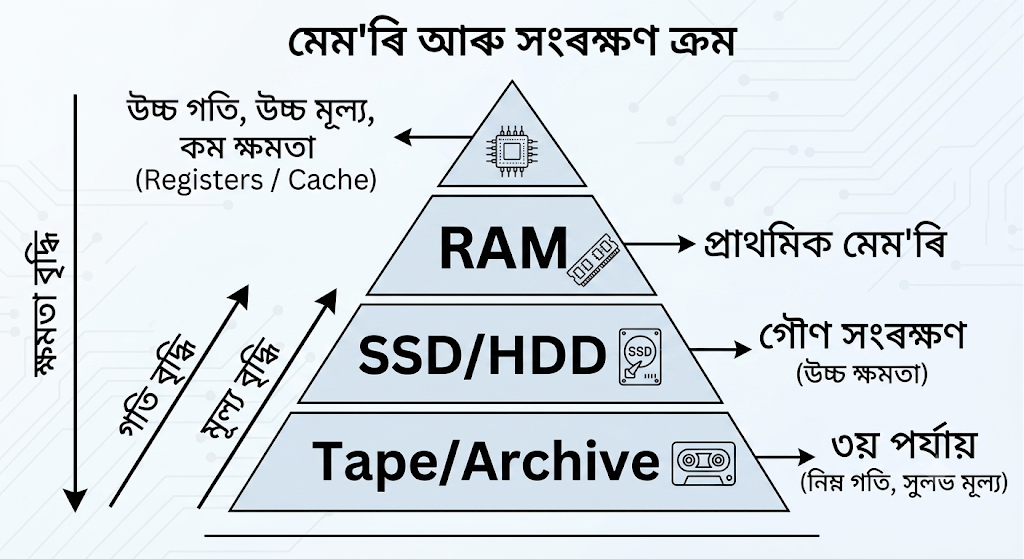
গুৰুত্ব:
মেম'ৰি প্ৰযুক্তি সমভাৱে দ্ৰুত আৰু সস্তা হ’ব নোৱাৰে। যদি সমগ্ৰ ব্যৱস্থাটো কেৱল উচ্চ গতিৰ কেচ মেম'ৰীৰে সাজিবলৈ যোৱা হয়, তেন্তে কম্পিউটাৰৰ মূল্য সাধাৰণ মানুহৰ ক্ৰয়ক্ষমতাৰ বাহিৰলৈ যাব। সংৰক্ষণ ক্ৰমে সিমানখিনি দ্ৰুততা আৰু সংৰক্ষণ ক্ষমতাৰ এনে এক ভাৰসাম্য (Optimization) আনি দিয়ে, যাতে ব্যৱস্থাটো খৰচৰ ফালৰ পৰা অৰ্থনৈতিক আৰু কাৰ্যক্ষমতাৰ ফালৰ পৰা দ্ৰুত হৈ পৰে।
২. প্ৰশ্ন: প্ৰাথমিক, গৌণ আৰু তৃতীয় পৰ্যায়ৰ সংৰক্ষণ ব্যৱস্থাৰ মাজত এক বিস্তৃত তুলনামূলক আলোচনা আগবঢ়োৱা।
উত্তৰ: কম্পিউটাৰ সংৰক্ষণ ব্যৱস্থাক কাৰ্যপ্ৰণালী আৰু স্থায়িত্বৰ ওপৰত ভিত্তি কৰি মূলত তিনিটা পৰ্যায়ত ভাগ কৰা হয়:
১. প্ৰাথমিক সংৰক্ষণ (Primary Storage):
প্ৰকৃতি: ই মুখ্যতঃ অস্থায়ী (Volatile)। বিদ্যুৎ নাথাকিলে ডাটা বিলুপ্ত হয়।
সংযোগ: চি.পি.ইউ. ৰ সৈতে পোনপটীয়াভাৱে মেম'ৰি বাছৰ যোগেদি সংযুক্ত।
গতি আৰু ক্ষমতা: ইয়াৰ এক্সেছ টাইম ন্যানো-ছেকেণ্ডত গণনা কৰা হয় (অতি দ্ৰুত), কিন্তু ক্ষমতা সীমিত (যেনে- ৪ জিবিৰ পৰা ৬৪ জিবি)।
উদাহৰণ: RAM, ROM, Cache Memory।
২. গৌণ সংৰক্ষণ (Secondary Storage):
প্ৰকৃতি: ই সম্পূৰ্ণ স্থায়ী (Non-volatile)। অপাৰেটিং চিষ্টেম আৰু ব্যৱহাৰকাৰীৰ ফাইলসমূহ ইয়াত সুৰক্ষিত থাকে।
সংযোগ: ইনপুট/আউটপুট নিয়ন্ত্ৰক (SATA, PCIe Controller) ৰ মাধ্যমেৰে এক্সেছ কৰা হয়।
গতি আৰু ক্ষমতা: ইয়াৰ গতি প্ৰাথমিক মেম'ৰীতকৈ কম, কিন্তু সংৰক্ষণ ক্ষমতা বহু বেছি (যেনে- ২৫৬ জিবিৰ পৰা কেইবা টেৰাবাইট পৰ্যন্ত)।
উদাহৰণ: SSD, Hard Disk Drive (HDD)।
৩. তৃতীয় পৰ্যায়ৰ সংৰক্ষণ (Tertiary Storage):
প্ৰকৃতি: ই অতিশয় স্থায়ী আৰু বিশেষভাৱে ডাটা আৰ্কাইভিং বা দুৰ্যোগ ব্যৱস্থাপনাৰ (Disaster Recovery) বেকআপ হিচাপে ব্যৱহাৰ হয়।
সংযোগ: ইয়াক প্ৰায়ে মানৱ চালিতভাৱে বা ৰোবোটিক মেকানিজমৰ দ্বাৰা মাদাৰবৰ্ডত ইনচাৰ্ট কৰিব লাগে।
গতি আৰু ক্ষমতা: ইয়াৰ এক্সেছ সময় যথেষ্ট বেছি (মন্থৰ), কিন্তু উৎপাদন খৰচ কম আৰু ডাটা সংৰক্ষণ ক্ষমতা পেটাবাইট (PB) পৰ্যায়ৰ।
উদাহৰণ: মেগনেটিক টেপ কাৰ্ট্ৰিজ, বDirectory/Blu-Ray Disks।
এই তিনিওটা স্তৰে কম্পিউটাৰত ডাটা প্ৰচেছিং, লগে লগে সংৰক্ষণ আৰু দীঘলীয়া সুৰক্ষাৰ ক্ৰমিক ভাৰসাম্য ৰক্ষা কৰে।
৩. প্ৰশ্ন: ক্লাউড সংৰক্ষণৰ ধাৰণা কি? Amazon S3 আৰু Azure Blob Storage ৰ সংৰক্ষণ আৰ্হিৰ (Storage Models) তুলনা কৰা।
উত্তৰ: ক্লাউড সংৰক্ষণ (Cloud Storage):
ক্লাউড সংৰক্ষণ হৈছে এনে এক প্ৰযুক্তি য'ত ডাটা স্থানীয় কম্পিউটাৰৰ ড্ৰাইভত ৰখাৰ পৰিৱৰ্তে ইণ্টাৰনেটৰ জৰিয়তে দুৰৱৰ্তী ডাটা চেণ্টাৰত থকা চাৰ্ভাৰত সংৰক্ষণ আৰু পৰিচালনা কৰা হয়। ইয়াৰ ফলত যিকোনো ঠাইৰ পৰাই ডাটা ব্যৱহাৰ কৰিব পাৰি।
Amazon S3 V/S Azure Blob Storage ৰ তুলনা:
| বৈশিষ্ট্য | Amazon S3 (AWS) | Azure Blob Storage (Microsoft) |
| প্ৰধান সংৰক্ষণ একক | Buckets আৰু Objects: ডাটাক 'অ'বজেক্ট' বুলি ধৰা হয় আৰু ইয়াক 'বাকেট'ৰ ভিতৰত ৰখা হয়। | Containers আৰু Blobs: ডাটাক 'ব্লব' বোলা হয় আৰু ইয়াক 'কনটেইনাৰ'ৰ ভিতৰত ৰখা হয়। |
| ব্লব/অ'বজেক্টৰ প্ৰকাৰ | মূলতঃ একপ্ৰকাৰৰ অবজেক্ট সংৰক্ষণ মানি চলে। | তিনি প্ৰকাৰৰ: Block Blobs (ফাইলৰ বাবে), Append Blobs (লগ ফাইলৰ বাবে), Page Blobs (VHDs ৰ বাবে)। |
| ডাটা টায়াৰ (Data Tiers) | S3 Standard, Intelligent-Tiering, Standard-IA, Glacier (আৰ্কাইভ)। | Hot Tier, Cool Tier, Cold Tier, আৰু Archive Tier। |
| সংযোগ সুবিধা | REST API, AWS CLI, SDKs ৰ জৰিয়তে অতি প্ৰচাৰিত। | REST API, Azure CLI, PowerShell আৰু Microsoft পৰিস্থিতিতন্ত্ৰৰ সৈতে সুন্দৰ সমন্বয়। |
সামৰণি:
দুয়োটা ব্যৱস্থাই ক্লাউড অবজেক্ট ষ্টোৰেজৰ ওপৰত প্ৰতিষ্ঠিত। এমেজন এস-৩ (S3) বহুলভাৱে গ্ৰহণযোগ্য আৰু ইয়াৰ স্থায়িত্ব প্ৰমাণিত, আনহাতে মাইক্ৰ'ছফ্টৰ ডাটাবেছ আৰু অপাৰেটিং চিষ্টেম ব্যৱহাৰ কৰা প্ৰতিষ্ঠানসমূহৰ বাবে Azure Blob Storage অধিক খাপ খোৱা।
৪. প্ৰশ্ন: ক্লাউড সংৰক্ষণত Data Durability, Availability, আৰু Scalability ৰ গুৰুত্ব বিস্তৃতভাৱে আলোচনা কৰা।
উত্তৰ: আজিকালি প্ৰতিষ্ঠানসমূহে থলুৱা হাৰ্ডৱেৰৰ সলনি ক্লাউড সংৰক্ষণৰ ওপৰত সম্পূৰ্ণ নিৰ্ভৰ কৰে। ইয়াৰ মূল কাৰণ হৈছে তিনিটা প্ৰধান স্তম্ভ: ডাটা স্থায়িত্ব (Durability), উপলব্ধতা (Availability), আৰু প্ৰসাৰণযোগ্যতা (Scalability)।
১. ডাটা স্থায়িত্ব (Data Durability): ডাটা স্থায়িত্বই ক্লাউডত সংৰক্ষিত ডাটা যাতে কোনো কাৰণতে মচি নাযায়, নষ্ট নহয় বা ক্ৰাপ্ট (Corrupt) নহয় তাৰ নিশ্চয়তা দিয়ে। ক্লাউড প্ৰদানকাৰীসকলে 'ডাটা ৰিপ্লিকেচন' (Data Replication) পদ্ধতি ব্যৱহাৰ কৰে। উদাহৰণস্বৰূপে, এমেজন S3 এ 99.999999999% (11 9s) স্থায়িত্ব আগবঢ়ায়। ইয়াৰ অৰ্থ হৈছে, ১,০০,০০,০০০ টা ফাইলৰ ভিতৰত ১০,০০০ বছৰত হয়তো মাত্ৰ এটা ফাইল হেৰোৱাৰ সম্ভাৱনা থাকে।
২. ডাটা উপলব্ধতা (Data Availability): উপলব্ধতাই সূচায় যে ব্যৱহাৰকাৰীয়ে বিচৰা মুহূৰ্ততে ডাউনটাইম (Downtime) নোহোৱাকৈ ডাটালৈ প্ৰৱেশ কৰিব পাৰিবনে নাই। ইয়াক শতাংশত জোখা হয় (যেনে- ৯৯.৯৯% Availability)। যদি কোনো এটা ডাটা চেণ্টাৰত বিদ্যুৎ কৰ্তন বা প্ৰাকৃতিক দুৰ্যোগ ঘটে, ক্লাউড চিষ্টেমে স্বয়ংক্ৰিয়ভাৱে অন্য ডাটা চেণ্টাৰৰ পৰা ডাটা উপলব্ধ কৰাই দিয়ে।
৩. প্ৰসাৰণযোগ্যতা (Scalability): পৰম্পৰাগত সংৰক্ষণত সংৰক্ষণ ক্ষমতা বৃদ্ধি কৰিবলৈ নতুন হাৰ্ড ডিস্ক ক্ৰয় কৰি মাদাৰবৰ্ডত লগাব লাগে। কিন্তু ক্লাউড সংৰক্ষণ হৈছে অসীম প্ৰসাৰণযোগ্য (Infinitely Scalable)। এটা প্ৰতিষ্ঠানে ৫ জিবিৰ পৰা হঠাত ৫ পেটাবাইটলৈ নিজৰ সংৰক্ষণ ক্ষমতা কোনো কাৰিকৰী বাধা নোহোৱাকৈ বৃদ্ধি কৰিব পাৰে।
সামৰণি: এই তিনিটা বৈশিষ্টই ক্লাউড সংৰক্ষণক অত্যন্ত সুৰক্ষিত, বিশ্বাসযোগ্য আৰু সকলো ধৰণৰ ব্যৱসায়িক প্ৰতিষ্ঠানৰ বাবে নিৰ্ভৰযোগ্য কৰি তুলিছে।
৫. প্ৰশ্ন: সংৰক্ষণ প্ৰযুক্তিত উদ্ভৱ হোৱা নতুন প্ৰৱণতা ফ্লেছ-আধাৰিত সংৰক্ষণ (SSD আৰু NVMe) ৰ বিষয়ে বিস্তৃত বিশ্লেষণ আগবঢ়োৱা।
উত্তৰ: কম্পিউটাৰ ডাটা সংৰক্ষণৰ ইতিহাসত মেগনেটিক ডিস্কৰ (HDD) পৰা ফ্লেছ-আধাৰিত সংৰক্ষণলৈ ক্ৰমবিকাশ হৈছে এক অন্যতম ডাঙৰ বিপ্লৱ। ফ্লেছ সংৰক্ষণে চিমিকণ্ডাক্টৰ চিপ (NAND Flash) ব্যৱহাৰ ڪري মেকানিকেল যন্ত্রাংশ নোহোৱাকৈ সংৰক্ষণ প্ৰক্ৰিয়া সমাপন কৰে।
১. সোলিড ষ্টেট ড্ৰাইভ (SSD): SSD হৈছে পৰম্পৰাগত হাৰ্ড ডিস্কৰ আধুনিক বিকল্প। HDD ত থকা ঘূৰ্ণীয়মান প্লেটাৰ (Rotating Platters) আৰু ৰিড/ৰাইট হেডৰ সলনি SSD ত মেম'ৰি চিপ ব্যৱহাৰ কৰা হয়।
সুবিধা: ইয়াৰ পঢ়া আৰু লিখাৰ গতি (Read/Write Speed) HDD তকৈ ৫ ৰ পৰা ১০ গুণ বেছি। ই কম বিদ্যুৎ খৰচ কৰে, গৰম কম হয় আৰু কোনো শব্দ নকৰে।
সীমা: প্ৰথম অৱস্থাত SSD বোৰ পুৰণি SATA ইণ্টাৰফেচত চলোৱা হৈছিল, যিটো মূলত মন্থৰ গতিৰ মেগনেটিক ড্ৰাইভৰ বাবেহে প্ৰস্তুত কৰা হৈছিল। ফলত SSD ৰ প্ৰকৃত গতি প্ৰকাশ পোৱাত বাধাৰ সৃষ্টি হৈছিল।
[ Traditional HDD ] ---> Magnetic Platter (Slow mechanical read) [ SATA SSD ] ---> NAND Flash Memory (SATA bus bottle-neck) [ NVMe SSD ] ---> NAND Flash + Direct PCIe Express Bus (Ultra Fast)
২. NVMe (Non-Volatile Memory Express) প্ৰযুক্তি: SATA ৰ এই গতিৰ সীমাবদ্ধতা আঁতৰাবলৈ NVMe প্ৰযুক্তিৰ বিকাশ কৰা হয়।
কাৰ্যপ্ৰণালী: NVMe হৈছে এক বিশেষ উচ্চ-গতিৰ যোগাযোগ প্ৰ'ট'কল, যিয়ে সংৰক্ষণ ড্ৰাইভক পোনপটীয়াভাৱে মাদাৰবৰ্ডৰ PCI Express (PCIe) বাছৰ সৈতে সংযোগ কৰে।
উৎকৃষ্টতা: SATA SSD এ একেলগে মাত্ৰ ১ টা ক্ৰম (Queue) আৰু ৩২ টা ক্ৰাফ্ট পঠিয়াব পাৰে, য’ত NVMe এ ৬৪,০০০ ক্ৰম আৰু প্ৰতিটো ক্ৰমত ৬৪,০০০ টা ক্ৰাফ্ট একেলগে প্ৰচেছ (Parallel Processing) কৰিব পাৰে। ইয়াৰ গতি ৭০০০ MB/s পৰ্যন্ত হ’ব পাৰে।
সামৰণি:
বৰ্তমান সময়ত কৃত্ৰিম বুদ্ধিমত্তা (AI), বিগ ডাটা (Big Data) আৰু হাই-পাৰফৰ্মেন্স কম্পিউটিং (HPC) ৰ চাহিদা পূৰণ কৰাত ফ্লেছ-আধাৰিত SSD আৰু NVMe প্ৰযুক্তি অপৰিহাৰ্য হৈ পৰিছে।
Very Short Answer Questions — 1 Mark
1. What is a storage system?
Answer: A storage system is a combination of hardware and software used to store, organize, protect, and retrieve digital data.
2. What is storage hierarchy?
Answer: Storage hierarchy is the arrangement of different storage technologies according to factors such as speed, capacity, cost, and access time.
3. Name the three major levels of storage mentioned in the syllabus.
Answer: The three major levels are primary storage, secondary storage, and tertiary storage.
4. What is primary storage?
Answer: Primary storage is the storage directly accessible by the processor for holding data and instructions currently required for processing, such as RAM.
5. What is secondary storage?
Answer: Secondary storage provides relatively permanent storage for data and programs. Hard disk drives (HDDs) and solid-state drives (SSDs) are examples.
6. What is tertiary storage?
Answer: Tertiary storage is generally used for large-scale, long-term, or archival data storage. Tape libraries are a common example.
7. What is cloud storage?
Answer: Cloud storage is a service in which data is stored on remote storage infrastructure and accessed through a network, usually the Internet.
8. What is data durability in cloud storage?
Answer: Data durability refers to the ability of a storage service to preserve data and prevent its loss or corruption over time.
9. What is availability in cloud storage?
Answer: Availability is the ability of a storage service to remain accessible and operational when users need to access their data.
10. What is scalability?
Answer: Scalability is the ability of a storage system to increase or decrease its storage capacity according to changing requirements.
11. What is flash-based storage?
Answer: Flash-based storage uses non-volatile flash memory to store data electronically without requiring mechanical movement.
12. What is an SSD?
Answer: An SSD (Solid-State Drive) is a storage device that uses flash memory to store data and has no mechanical moving parts.
13. What is NVMe?
Answer: NVMe (Non-Volatile Memory Express) is a high-speed storage protocol designed primarily to communicate with non-volatile memory devices such as SSDs over PCIe.
14. Give one example of a cloud storage service.
Answer: Amazon S3 is an example of a cloud storage service.
15. Why is storage hierarchy necessary?
Answer: Storage hierarchy helps balance speed, capacity, and cost by using different types of storage for different data-access requirements.
B. Short Answer Questions — 2 Marks
1. Explain the concept of storage hierarchy.
Answer: Storage hierarchy organizes storage technologies into different levels based on speed, capacity, cost, and access time. Faster storage is generally more expensive and has lower capacity, while slower storage is usually cheaper and offers greater capacity. Primary, secondary, and tertiary storage represent important levels of this hierarchy.
2. What are the main characteristics of primary storage?
Answer: Primary storage is directly or closely accessed by the processor during computation. It provides fast data access but generally has limited capacity compared with secondary storage. RAM is a major example. Most primary memory is volatile, meaning its contents are lost when power is removed.
3. What are the main characteristics of secondary storage?
Answer: Secondary storage is designed for persistent data storage and normally retains information even when the system is powered off. It generally provides greater capacity than primary storage at a lower cost per unit of storage. HDDs and SSDs are common examples of secondary storage.
4. What is tertiary storage and where is it useful?
Answer: Tertiary storage is intended mainly for large-volume, long-term, or archival storage. It may involve removable or automated storage media, such as magnetic tape libraries. It is useful for maintaining backups, historical records, and data that does not require frequent or immediate access.
5. Differentiate between primary and secondary storage.
Answer: Primary storage is closely associated with active processing and provides faster access but usually has limited capacity. Secondary storage is mainly used for persistent storage of programs and data and generally provides much larger capacity. RAM represents primary storage, while HDDs and SSDs represent secondary storage.
6. What is meant by cloud storage?
Answer: Cloud storage is a model in which users store data on storage infrastructure operated by a cloud provider rather than relying entirely on local devices. Data can be accessed through a network. Cloud storage can provide flexible capacity, remote access, and managed storage resources.
7. Explain data durability in cloud storage.
Answer: Data durability indicates how reliably a cloud storage service can preserve stored data against loss or corruption. Cloud providers may use mechanisms such as replication, redundancy, error detection, and geographically separated infrastructure to improve protection. Higher durability is particularly important for valuable or irreplaceable data.
8. What is availability in cloud storage?
Answer: Availability refers to how consistently users can access a cloud storage service and their stored data when required. High availability can be supported through redundant systems, multiple storage components, and fault-tolerant infrastructure. Availability focuses mainly on accessibility of the service rather than permanent preservation of data.
9. Explain scalability in cloud storage.
Answer: Scalability is the capability of a cloud storage system to accommodate changing amounts of data. Users can increase storage capacity as their requirements grow without necessarily purchasing and maintaining physical storage equipment themselves. This makes cloud storage suitable for applications with unpredictable or rapidly changing storage requirements.
10. What are cloud storage models?
Answer: Cloud storage models describe different ways in which storage resources are provided and accessed through cloud infrastructure. They can support different requirements concerning access, capacity, management, and application use. Examples include object-oriented storage services such as Amazon S3 and Azure Blob Storage.
11. What is Amazon S3?
Answer: Amazon Simple Storage Service (Amazon S3) is a cloud-based object storage service. It stores data as objects within containers called buckets. It is designed for scalable storage and is widely used for backups, application data, media files, archives, and other digital content.
12. What is Azure Blob Storage?
Answer: Azure Blob Storage is Microsoft's cloud storage service for storing large amounts of unstructured data. It is suitable for objects such as documents, images, videos, backups, and logs. It provides scalable storage that can be accessed by applications and users through Azure's cloud infrastructure.
13. What are the advantages of flash-based storage?
Answer: Flash-based storage provides fast data access and does not require mechanical movement. Consequently, it can offer lower access latency, reduced mechanical wear, and efficient operation compared with traditional mechanical disk storage. SSDs are a major example of flash-based storage technology used in modern computing systems.
14. What is the significance of NVMe in modern storage?
Answer: NVMe is designed to efficiently communicate with non-volatile memory devices, especially SSDs, through high-speed interfaces such as PCIe. Compared with older storage protocols designed around mechanical disks, NVMe can reduce communication overhead and support high throughput and low latency.
15. How are SSD and HDD different?
Answer: An SSD stores data using flash memory and has no mechanical moving parts, allowing fast access and low latency. An HDD stores data magnetically on rotating disks and uses mechanical components. SSDs generally provide better performance, while HDDs can offer large storage capacity at relatively low cost.
C. Long Answer Questions — 5 Marks
1. Explain storage hierarchy and discuss primary, secondary, and tertiary storage.
Answer: Storage hierarchy is the systematic arrangement of different storage technologies according to their speed, access time, capacity, cost, and purpose. A computer system uses multiple storage levels because no single technology can simultaneously provide extremely high speed, large capacity, and very low cost.
Primary storage is the storage most closely associated with active processing. The processor accesses it directly or through the memory subsystem. RAM is a major example. Primary storage is relatively fast but generally has limited capacity and higher cost per unit of storage. RAM is also volatile, so its contents normally disappear when power is removed.
Secondary storage is used for persistent storage of programs and data. It generally provides much greater capacity than primary storage and retains information after power is switched off. HDDs and SSDs are common examples.
Tertiary storage is mainly intended for large-scale, long-term, or archival storage. Magnetic tape libraries are an important example. Tertiary storage is useful for backups and information that does not need frequent access.
Thus, storage hierarchy allows a computing system to balance performance, capacity, permanence, and cost by assigning different types of data to appropriate storage levels.
2. Explain cloud storage and discuss the importance of data durability, availability, and scalability.
Answer: Cloud storage is a method of storing digital information on infrastructure operated by a cloud service provider and accessing that information through a network. Instead of depending entirely on locally installed storage devices, users can use storage resources provided and managed by the cloud provider.
Three important characteristics of cloud storage are data durability, availability, and scalability.
Data durability refers to the ability of a storage service to preserve data reliably and protect it from loss or corruption. Cloud providers can use redundancy, replication, error detection, and other protective mechanisms to improve durability.
Availability refers to the ability of users to access the storage service and their data when required. Redundant components and fault-tolerant infrastructure can help maintain service availability even when individual components fail.
Scalability means that storage capacity can be increased or adjusted according to changing requirements. This is particularly useful for organizations and applications whose data volume grows over time.
Cloud storage therefore provides an adaptable approach to data storage. Its combination of persistent storage, network-based access, durability mechanisms, availability features, and scalable capacity makes it useful for modern computing environments.
3. Discuss cloud storage models with reference to Amazon S3 and Azure Blob Storage.
Answer: Cloud storage models provide different approaches for storing and accessing data through cloud infrastructure. One important model is object storage, in which data is stored as individual objects along with associated metadata. Object storage is particularly suitable for large amounts of unstructured data such as images, videos, documents, backups, and logs.
Amazon Simple Storage Service (Amazon S3) is a widely used cloud object storage service. It stores objects in containers known as buckets. Applications can use S3 to store and retrieve large quantities of data without maintaining the underlying physical storage infrastructure themselves.
Azure Blob Storage is Microsoft's cloud service for storing large amounts of unstructured data. It is designed for information such as documents, media files, backups, and application data. It provides scalable storage resources within the Microsoft Azure environment.
Both services demonstrate how cloud storage can separate data storage from the user's physical hardware. They can support large-scale storage requirements and provide network-based access to stored information.
Cloud storage models are important because they allow organizations to use storage resources according to their requirements rather than depending exclusively on locally installed devices. They also support flexible capacity and professionally managed storage infrastructure.
4. Explain flash-based storage technology, including SSD and NVMe, and discuss its significance as an emerging trend in storage.
Answer: Flash-based storage is a modern storage technology that uses non-volatile flash memory to retain digital information. Unlike magnetic hard disk drives, flash storage does not depend on rotating disks or moving read/write heads. This fundamental difference allows flash-based devices to provide fast access and low latency.
An SSD (Solid-State Drive) is a common flash-based storage device. It stores information electronically in flash memory cells. Since an SSD has no mechanical moving parts, it generally provides faster access, lower mechanical wear, and quieter operation than an HDD.
NVMe (Non-Volatile Memory Express) is a storage protocol designed to communicate efficiently with non-volatile memory devices, particularly SSDs. NVMe devices commonly use the PCI Express (PCIe) interface, which provides a high-speed communication pathway. NVMe can reduce protocol overhead and provide high throughput and low latency.
Flash-based storage is an important emerging trend because modern applications increasingly require rapid access to large volumes of data. SSDs and NVMe-based storage can improve system responsiveness, application performance, and data-transfer efficiency.
Therefore, the movement from mechanical storage toward flash-based technologies represents an important development in modern storage systems, particularly where high performance and low latency are important.
5. Compare primary, secondary, tertiary, and cloud storage in terms of their characteristics and applications.
Answer: Different storage technologies serve different purposes in a computing environment. Primary storage is closely connected with active processing and provides rapid access to information required by the processor. RAM is a major example. It generally has limited capacity and, in the case of RAM, is volatile.
Secondary storage provides persistent storage for programs and data. It offers substantially greater capacity than primary storage and retains information when the system is powered off. HDDs and SSDs are common examples. SSDs provide particularly fast access because they use flash memory.
Tertiary storage is primarily associated with large-scale archival and backup requirements. Magnetic tape libraries are a common example. It is appropriate for data that must be retained for long periods but does not require constant immediate access.
Cloud storage stores data on remote infrastructure managed by a cloud provider and makes it accessible through a network. Examples include Amazon S3 and Azure Blob Storage. Cloud storage is notable for its flexibility, scalability, availability, and durability mechanisms.
These storage types are not competitors in every situation. Instead, they complement one another. Primary storage supports active computation, secondary storage provides everyday persistent storage, tertiary storage supports archival needs, and cloud storage provides flexible, remotely managed storage services. Together, they form an important part of modern storage systems.